MoodFlix Thumbnail

MoodFlix Documentation

Version V1.0.0

MoodFlix Documentation

Mood-Based Movie & TV Show Discovery Platform

Laravel 12 PHP 8.4+ MySQL Multi-Payment

Product Overview

MoodFlix is a comprehensive, production-ready web application that revolutionizes how users discover movies and TV shows. Instead of traditional browsing, users select a mood and receive intelligent, personalized recommendations curated from a vast database of movies and TV content.

Built with Laravel 12 and modern web technologies, MoodFlix combines content discovery with:

Perfect for entertainment platforms, content aggregators, and any service needing sophisticated movie/TV show discovery and e-commerce features.

Features

Frontend Features

🎭 Mood-Based Discovery

Users select a mood and get intelligent recommendations with genre mapping

🎬 Content Library

Browse thousands of movies and TV shows with detailed information

🔍 Advanced Search

Filter by genre, language, rating, year, and streaming platform

📺 TV Series

Complete seasons and episodes with air dates and ratings

🎫 Ticket Booking

Book cinema tickets with dynamic pricing and seat selection

🛍️ E-Commerce

Shop for merchandise with full cart and checkout

👤 User Dashboard

Wishlist, order history, browse history, and profile management

📱 Responsive Design

Modern dark theme, optimized for all devices

Admin Panel Features

📊 Dashboard

Real-time statistics and quick actions

🎬 Movies

Create/edit movies with posters and trailers

📺 TV Shows

Manage seasons and episodes

🎭 Cast Management

Actor profiles with TMDB import

🛒 Products

E-commerce inventory management

📦 Orders

Order tracking and payment management

💳 Payment Methods

7 payment gateway configurations

🎫 Screenings

Cinema screening management

🏷️ Genres & Moods

Customize mood/genre mappings

🌐 Languages

Multi-language support

🔗 TMDB Import

Import movies from TMDB API

⚙️ Settings

System-wide configuration

Technology Stack

Layer Technology Purpose
Backend PHP 8.4+, Laravel 12 Core framework and routing
Frontend Blade Templates, Tailwind CSS, Alpine.js UI rendering and interactivity
Database MySQL 8.0+ Data persistence
Authentication Laravel Breeze User authentication
HTTP Client Axios, Laravel Http API requests and AJAX
Payment Processing Official SDKs (Stripe, PayPal, etc.) Payment gateway integration
File Storage Laravel Storage Media management
Testing PHPUnit Automated testing

System Requirements

Minimum Requirements

PHP

8.4+ (with curl, json, mbstring, xml extensions)

Database

MySQL 8.0+

Composer

2.0+

Recommended Specifications

Installation Guide

Step 1: Extract Files & Create Database

Extract the ZIP archive to your web server document root and create a MySQL database:

CREATE DATABASE smart_workforce_hub CHARACTER SET utf8mb4 COLLATE utf8mb4_unicode_ci;

Step 2: Run Installer Wizard

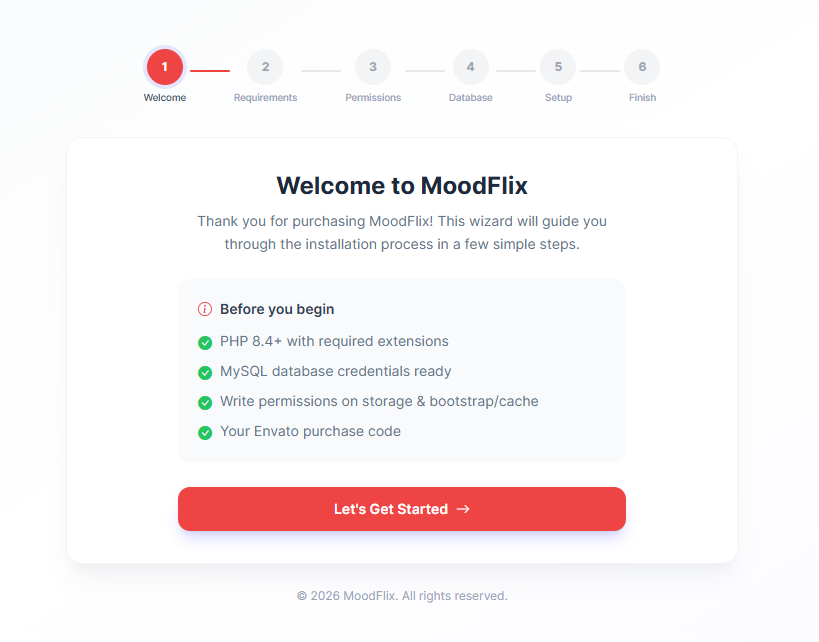
After extracting the files, run the installer wizard by accessing the application(your domain) in your browser.

The installer will guide you through environment checks, database configuration, and admin account setup.

installer step 1

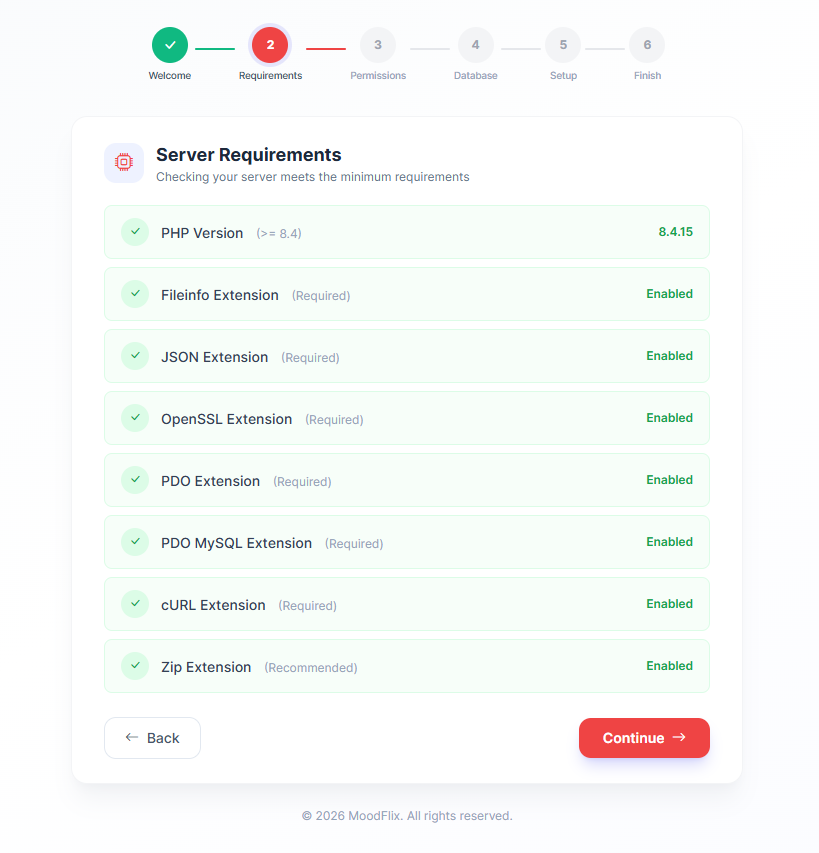
Step 3: Check Application Requirements

The installer will check for required PHP extensions, file permissions, and environment compatibility. Ensure all checks pass before proceeding.

installer step 2

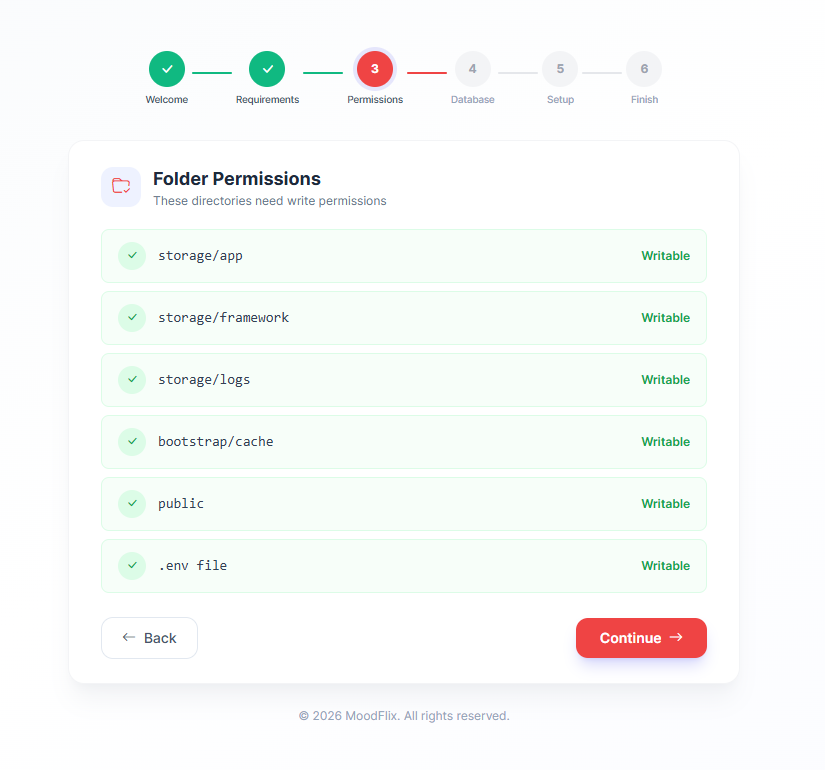
Step 4: Set File Permissions

Ensure the following directories have write permissions (chmod 755 or 775):

installer step 3

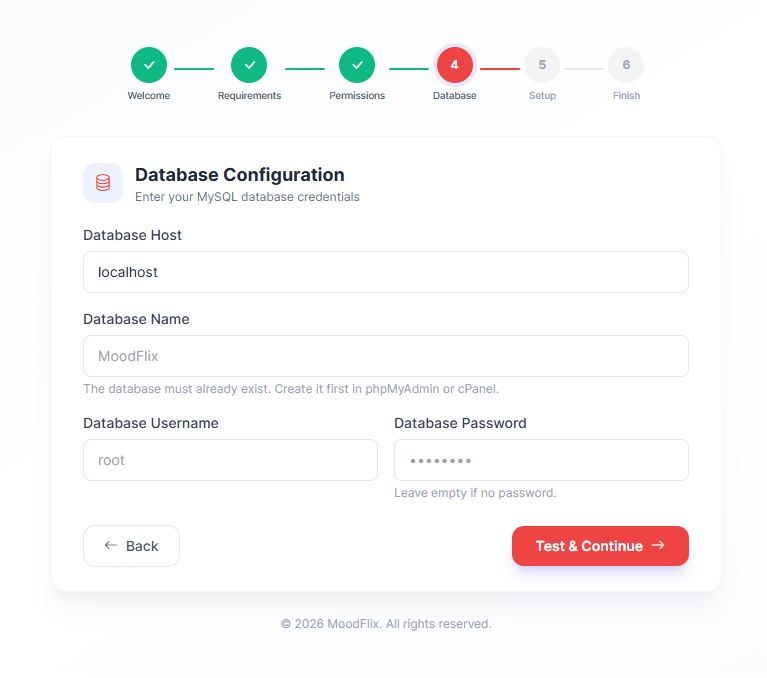
Step 5: Database Configuration

Enter your database connection details. The installer will attempt to connect and run migrations/seeding automatically.

installer step 4

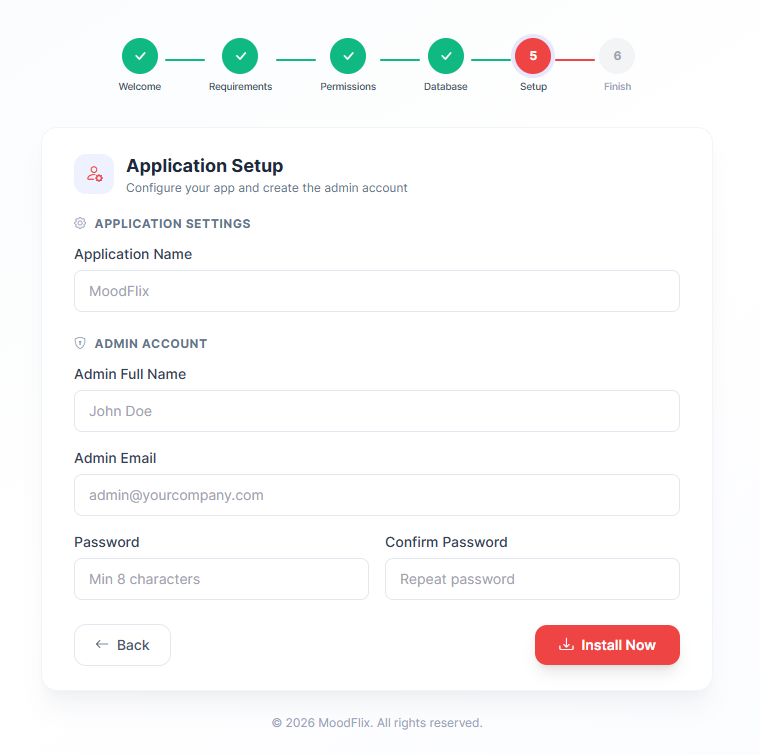
Step 6: Admin User Setup

Create your admin user account and configure initial settings.

installer step 5

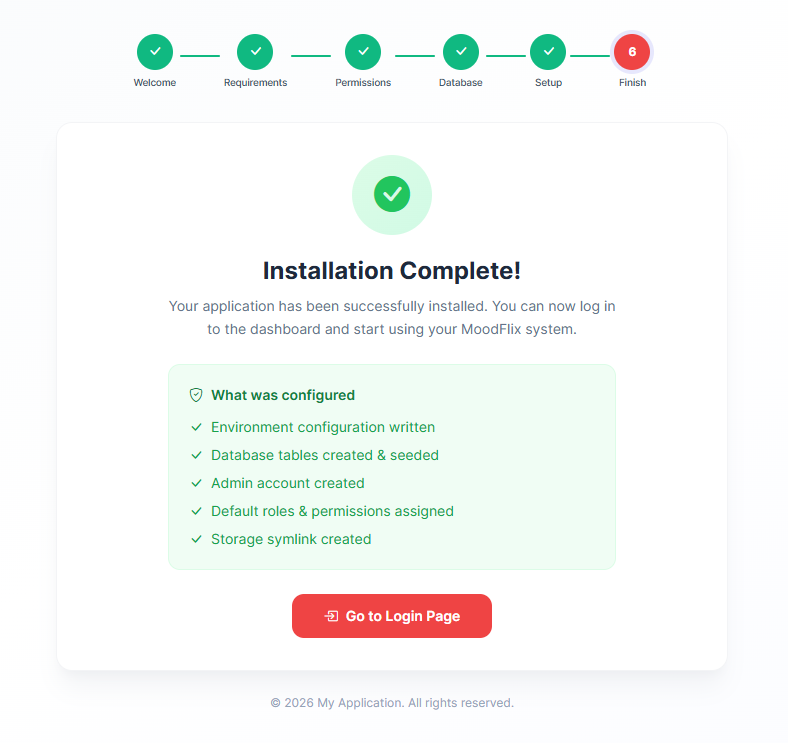
Step 7: Finalize Installation

Installation is complete. You can now access the application.

installer step 6

Step 8: Login

Access the application and login with your given credentials:

Role Email Password
Admin your-email@example.com your-password
✓ Installation Complete! Your MoodFlix installation is ready. Change the admin password immediately in production.

Admin Panel — Complete Guide

The MoodFlix admin panel is a comprehensive management hub for all platform operations. Access it via /admin with administrator credentials.

Dashboard

Your control center with real-time insights:

Content Management

Manage all entertainment content on your platform. This section handles movies, TV shows, channels, cast, genres, moods, and more.

Movies

TV Shows

TV Channels

Moods

Genres

Cast & Actors

Platforms

Watch Paths

Screenings

Commerce Management

Complete e-commerce system for selling merchandise and managing transactions.

Product Categories

Products

Orders

Coupons

Payments

Management Section

Manage users, pages, and platform languages.

Users

Pages

Languages

System Configuration

Core platform settings and integrations.

Settings

TMDB Import

View Site

Access & Security

Feature Description
Protected Access Admin panel requires login; only administrators can access
Session Management Automatic logout on inactivity for security
Audit Logs Track all admin actions for compliance and troubleshooting
SSL/HTTPS Recommended for all admin and user-facing communications

Platform Features & Capabilities

Core User Features

Cinema Booking System

E-Commerce Features

Payment & Security

Analytics & Reporting

Technical Features

Supported Payment Gateways

✓ Stripe

Credit cards, Apple Pay, Google Pay

✓ PayPal

PayPal accounts & cards

✓ Razorpay

India-focused, UPI, Cards

✓ Chapa

Ethiopia payments

✓ Paystack

Africa payments

✓ Flutterwave

Multi-currency, Africa

✓ Mollie

European payments

✓ COD

Cash on Delivery

Configuration Steps

  1. Get API keys from your payment provider
  2. Go to Admin → Payment Methods
  3. Enable desired payment methods
  4. Edit and configure API credentials
  5. Test transactions

Payment Flow

  1. User adds products to cart
  2. Proceeds to checkout
  3. Selects payment method
  4. Redirected to payment gateway
  5. On success, order created and marked as paid
  6. User receives confirmation email

API Integration

TMDB (The Movie Database)

MoodFlix integrates with TMDB to provide thousands of movies and TV shows:

Features

How to Use

  1. Go to Admin → TMDB Import
  2. Search for movies or select genres
  3. Review and import selected content
  4. Images automatically downloaded to storage
Tip: TMDB has rate limits. For large imports, use bulk genre imports and stagger requests.

FAQ & Troubleshooting

General Questions

Q: Is this a hosted solution or do I need my own server?

A: This is a self-hosted solution. You need your own web server with PHP, MySQL, and SSH access. It's not a SaaS platform.

Q: Can I customize the design and branding?

A: Yes, completely! You have full access to the source code. Customize colors, logos, themes, and layouts using Laravel Blade templates and Tailwind CSS.

Q: Can I use this on shared hosting?

A: Yes, if your hosting supports PHP 8.4+, MySQL 8.0+, and provides SSH access. You may need to contact your host to enable Composer or increase resource limits.

Q: Do I need Node.js to run this?

A: No. Assets are pre-compiled. Node.js is only needed if you want to modify frontend CSS/JavaScript.

Q: What about free trials or demo?

A: Check CodeCanyon's preview/demo features. Install locally first to test before deploying to production.

Installation & Setup

Q: Is installation difficult?

A: MoodFlix includes an automated installer wizard that guides you through setup step-by-step. No command-line knowledge required for basic installation.

Q: Can you install it for me?

A: Contact support at rokbyte@gmail.com for paid installation and setup services.

Q: What's needed before installation?

A: Web hosting, domain name, SSL certificate, and API keys for TMDB and payment gateways. The installer checks everything for you.

Content Management

Q: How do I add movies?

A: Two methods: (1) Manual entry via Admin → Movies → Create, or (2) Bulk import from TMDB via Admin → TMDB Import.

Q: Can I import from TMDB automatically?

A: Yes! Built-in TMDB importer lets you search and import movies, TV shows, cast, episodes, and images automatically. Requires free TMDB API key.

Q: How long does TMDB import take?

A: Single movie imports take seconds. Large bulk imports (1000+ items) run in background via queue system.

Q: Can I edit movies after importing?

A: Yes. All imported data is fully editable. You can modify titles, descriptions, images, cast, pricing, and anything else.

Q: How do I manage TV series?

A: Admin → TV Shows. Create show → Add Seasons → Add Episodes. Full episode-level metadata support (title, air date, guest stars, etc.).

Payments & E-Commerce

Q: What payment methods are supported?

A: 8+ gateways: Stripe, PayPal, Razorpay, Chapa, Paystack, Flutterwave, Mollie, and Cash on Delivery (COD).

Q: How do I set up payments?

A: Get API keys from payment provider → Admin → Payment Methods → Enable and configure → Test mode available for testing.

Q: Can I accept multiple currencies?

A: Yes. Stripe, Razorpay, Flutterwave, and Mollie support multiple currencies. Configure in payment settings.

Q: Can I process refunds?

A: Yes. Refund directly from Admin → Orders. Refunds are processed through your payment gateway.

Q: Can customers save payment methods?

A: Yes. Payment gateways like Stripe support saved cards for faster checkout on future purchases.

Cinema Booking

Q: How do I set up cinema screenings?

A: Admin → Screenings. Create screening with movie, date, time, theater, seat layout, and ticket prices.

Q: Can I have different seat prices (VIP, Regular, etc.)?

A: Yes. Define seat categories (Premium, Regular, Economy) with different prices in theater configuration.

Q: Do customers get booking confirmation?

A: Yes. Automatic email with QR code or booking reference. Customers can cancel and get refunds based on your policy.

Multi-Language Support

Q: Is the platform multi-language?

A: Yes! Admin → Languages. Add any language you want. Users can switch languages in the frontend. Supports RTL languages (Arabic, Urdu, etc.).

Q: How do I translate content?

A: Movies, products, pages, and UI text can all be translated. Edit in each language separately in the admin panel.

Admin & Reporting

Q: What's the default admin login?

A: Set during installation. Change password immediately in production for security.

Q: Can I create multiple admin users?

A: Yes. Admin → Users. Create as many admins as needed with full or limited permissions.

Q: What analytics are available?

A: Sales dashboard, revenue, orders, users, popular content, booking stats. Export reports in CSV format.

Q: Can I backup my data?

A: Yes. Backup database via phpMyAdmin or command line. Keep regular backups for safety.

Security

Q: Is the application secure?

A: Yes. Built on Laravel with CSRF protection, SQL injection prevention, XSS protection, and secure password hashing.

Q: Are payments secure?

A: Yes. PCI-DSS compliant. Payment gateways handle sensitive data; your server never sees full credit card numbers.

Q: Should I use SSL/HTTPS?

A: Absolutely yes. Use HTTPS on your domain for payment pages and admin panel. Most hosts offer free SSL (Let's Encrypt).

Q: Are API keys stored securely?

A: Yes. All sensitive settings are encrypted and stored securely in the database. Never exposed in source code.

Technical & Development

Q: Can I extend the functionality?

A: Yes. Full Laravel source code available. You can add custom features, packages, and integrations.

Q: Is there an API for custom development?

A: Yes. RESTful API built-in. Extensive code documentation for developers. Webhook support for real-time updates.

Q: What's the codebase size?

A: Approximately 50+ Laravel files with comprehensive code organization. Well-documented and follows Laravel best practices.

Q: Is it production-ready?

A: Yes, fully production-ready with proper error handling, logging, and performance optimization.

Troubleshooting

Storage Link Error

php artisan storage:link

Database Connection Error

# Verify credentials in .env
# Ensure MySQL is running
php artisan migrate

Permission Denied on Storage

chmod -R 775 storage/
chmod -R 775 bootstrap/cache

Clear Cache

php artisan cache:clear
php artisan view:clear
php artisan route:clear

TMDB Import Issues

Email Not Sending

Need More Help?

Email: rokbyte@gmail.com

Documentation: This guide covers all features and configuration

Laravel Community: Extensive Laravel resources available online

Database Connection Error

# Verify credentials in .env
# Ensure MySQL is running
php artisan migrate

Permission Denied on Storage

chmod -R 775 storage/
chmod -R 775 bootstrap/cache

Clear Cache

php artisan cache:clear
php artisan view:clear
php artisan route:clear

Changelog

v1.0.0 — Initial Release
  • Mood-Based Discovery: Intelligent recommendation engine powered by mood selection and genre mapping
  • Content Management: Movies, TV shows, seasons, episodes, cast/crew directory
  • Cinema Booking System: Theater management, seat selection, dynamic pricing, screening management
  • E-Commerce Platform: Product catalog, shopping cart, orders, coupons, inventory management
  • Admin Panel: Complete dashboard with content, commerce, user, and system management
  • Multi-Payment Support: 8 payment gateways (Stripe, PayPal, Razorpay, Chapa, Paystack, Flutterwave, Mollie, COD)
  • Multi-Language Support: Support for multiple languages with RTL text support
  • User Management: Registration, profiles, wishlists, browse history, order tracking
  • Installer Wizard: Automated installation and setup guidance
  • Database Migrations: Complete schema with all tables and relationships
  • TMDB Importer: Advanced search, bulk import by genre, cast & crew import, episode support
  • TMDB Media Handling: Download images locally or use remote URLs, genre mapping
  • Google Social Login: OAuth integration for users to sign in/sign up with Google accounts
  • Google OAuth Configuration: Requires Google Client ID & Secret configuration
  • Auto User Creation: Automatic user profile creation from Google account data

📌 Note: v1.0.0 is a comprehensive initial release with all core and premium features included. Keep this changelog updated with each future release.

Support & Contact

For additional support and updates:

If you need help with MoodFlix, please don't hesitate to reach out to our support team. We're here to help! Contact Support to rokbyte@gmail.com

✓ Ready to Deploy! MoodFlix is production-ready. Follow best practices for security, backups, and performance optimization.